Where should I put prices on my business website?
A practical price-placement guide for Melbourne small businesses.
 Robert TicknerWeb designer, Melbourne
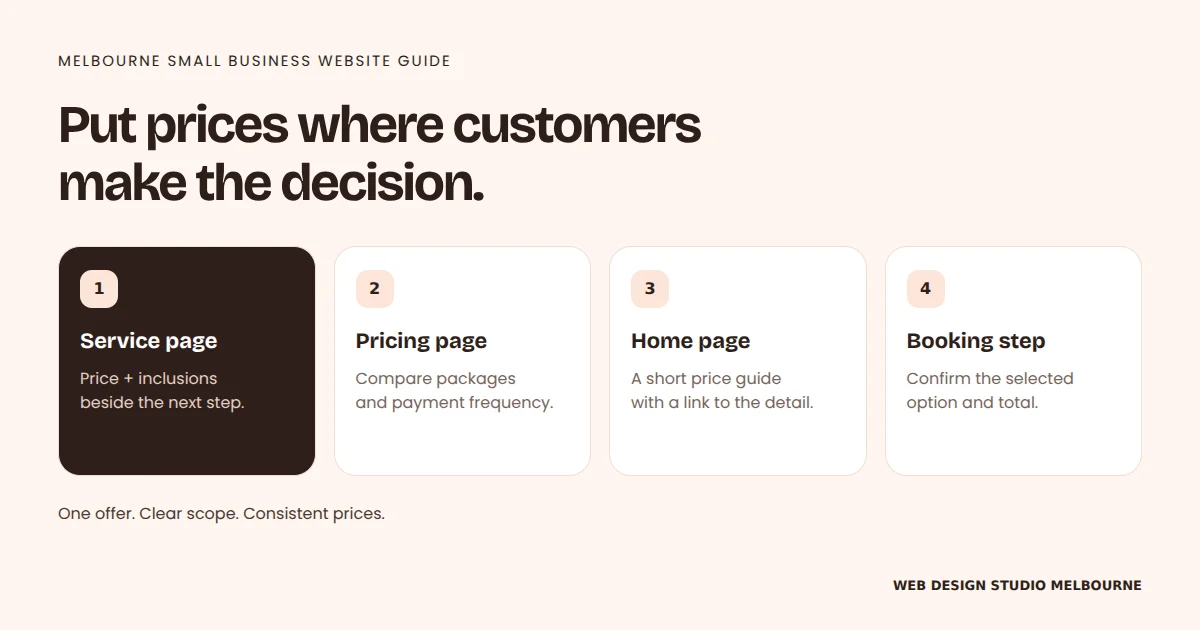
Put the relevant price beside the inclusions and enquiry button on your service page.
Use a pricing page to compare packages, and link to it from related services.
Give your Home page a short price guide, then confirm the total before booking.
For custom work, explain what changes the quote instead of guessing a fixed price.
On this page
- Where should prices appear on a business website?
- Should I put prices on each service page?
- Do I need a separate pricing page?
- Should prices be on my Home page?
- When should I confirm the price during booking?
- Should I show a fixed price, a starting price or a quote?
- What does this look like for Melbourne businesses?
- What information belongs beside a website price?
- How do I keep website prices consistent?
- How will I know whether the new pricing layout helps?
- Common questions about website pricing
- Make your next pricing decision easy to understand
A customer has found your business, likes what you offer and wants to know whether it fits their budget. That is the moment your price needs to help them. Sending them through three unrelated pages to find it creates another task before they can enquire.
For a Melbourne service business, start with the page that explains the service. Put the price, starting price or quote process beside the inclusions and a clear next step. A separate pricing page can help people compare packages, but it should not carry all the responsibility. This is one part of building a service page that makes enquiries easier.
Where should prices appear on a business website?
Show prices where customers make the decision that the price relates to. For most service businesses, that means the service page first, a pricing page for comparisons, a short Home page summary and confirmation before someone books or buys.
On a small screen, scroll the table to view every column.
| Website location | What belongs there | What it helps customers decide |
|---|---|---|
| Service or product page | The relevant price, what it includes and how to proceed | Is this the right service for my needs and budget? |
| Dedicated pricing page | Comparable packages, billing frequency and important differences | Which option suits me? |
| Home page | A concise price guide or a link to the relevant pricing | Am I looking at the right kind of business? |
| Booking or purchase step | The total for the selected option and any relevant terms | What am I agreeing to pay? |
Should I put prices on each service page?
Yes, when you can give a useful and accurate price for that service. Place a short pricing block after customers understand the offer and before the main enquiry or booking button. If price is central to the offer, include a brief price cue near the top as well.
Keep the context together: service, scope, price and next step. A visitor comparing Melbourne carpet-cleaning businesses should be able to see which rooms or treatments a package covers without opening another page. Our website copy guide explains how to answer those customer questions in a sensible order.
Do I need a separate pricing page?
A dedicated pricing page is useful when you have several packages or customers need to compare inclusions. Use the same rows for each option, show recurring and once-off charges separately, and explain any limits that materially change the offer.
Link to that page from your navigation and relevant service paragraphs. Keep a summary on the service pages so a customer can understand the offer without losing their place. If you are planning a new small business website, decide early whether you are selling one straightforward service or several options that need a comparison.
Should prices be on my Home page?
Put a short pricing summary on your Home page when it helps visitors judge whether your business suits them. It might be a package price, a clearly explained starting price or a sentence about how you quote.
Let the summary lead to the detailed service or pricing section. The Home page still needs to explain who you help, what you do and how to contact you. Our guide to what a small business Home page needs to explain helps you fit pricing into that flow.
When should I confirm the price during booking?
Confirm the price for the selected service before the customer commits. If they choose extras or a different package, the displayed total should reflect that choice. Make the billing frequency clear for a subscription or ongoing service.
Do not leave an old price on the website while the booking tool shows a different amount. Test that journey on a phone, including any external booking screen. Use the same task-based approach as our mobile website checks.
Should I show a fixed price, a starting price or a quote?
Choose the price format that honestly reflects how the work is scoped. A fixed price suits a defined offer. A starting price or range needs an explanation of what changes the cost. A quote suits work you cannot reasonably price before understanding the job.
On a small screen, scroll the table to view every column.
| Price format | Useful when | Explain beside the price |
|---|---|---|
| Fixed price | The service and inclusions are defined | Exactly what is included and what is extra |
| Starting price | There is a real entry-level option | What that option covers and what increases the cost |
| Price range | Scope varies within a meaningful range | Which requirements move a job towards either end |
| Individual quote | The job needs assessment or a detailed brief | The factors you assess and how to request a quote |
Avoid a low headline price that applies to an option customers cannot realistically choose. If every enquiry needs a quote, say so and make the process useful: what information you need, whether a site visit is required and what happens next. Clear scope matters just as much as the number, as our guide to website costs that get missed when comparing quotes shows.
What does this look like for Melbourne businesses?
The placement stays similar across businesses; the pricing explanation changes with the service. These examples are illustrative, rather than client results or estimates of Melbourne market prices.
A Brunswick hair salon: publish prices beside each defined service and its booking button. Explain whether hair length, extra treatments or another selection changes the price. Repeat the selected service and total in the booking flow.
A Bayside gardener: if the work depends on property size, access and green-waste removal, explain those factors beside the enquiry button. A genuine minimum or starting service can have a starting price, provided its scope is clear. Ask for the suburb, property details and useful photos when quoting.
A cabinet maker serving Melbourne’s northern suburbs: explain how dimensions, materials, installation and site requirements affect a custom quote. Show genuine project examples to explain the work, then tell customers what to send for an initial conversation. Inventing a fixed price for an undefined fit-out would make the page less useful.
For local searches, put genuine service-area information alongside the offer. A suburb name does not explain whether travel or access changes the cost. Our local SEO Melbourne service connects accurate business details with useful service pages, while the guide to local campaign landing pages explains how to keep a campaign’s location, offer and enquiry step aligned.
What information belongs beside a website price?
A useful price block explains the amount, the scope and the commitment. Customers should not have to guess whether the number is a deposit, a monthly payment or the complete cost of a defined service.
- What is included: name the deliverables, appointment length or service scope.
- What changes the cost: explain relevant extras, access requirements or additional work.
- How often it is paid: separate once-off, monthly and other recurring charges.
- How tax and unavoidable charges are handled: present the applicable total clearly.
- What happens next: say whether the button books a service, requests a quote or starts a conversation.
For example, our website pricing section separates the $199 Starter AI build fee from its $39 monthly plan, and the $549 Core build fee from its $59 monthly plan. Local Essentials includes a free website build or refresh with a $249 monthly plan. The free build is an inclusion of that ongoing plan; the monthly price belongs beside it.
The ACCC’s price-display guidance explains that consumer-facing prices generally need to show a clear minimum total, including GST and unavoidable fees when those amounts can be calculated. A total should be at least as prominent as a partial price. The guidance distinguishes offers made only to other businesses. Check the guidance for your situation when setting up a price display.
How do I keep website prices consistent?
Check one offer across four places: Home, service page, pricing page and booking or enquiry step. The amount, inclusions and payment frequency should agree wherever that offer appears.
Use this short review whenever you change a price:
- Write down the current offer, including any once-off and ongoing charges.
- Open every page and connected tool where that offer appears.
- Compare the number, inclusions, billing frequency and important conditions.
- Update old price references in FAQs, articles and downloadable material.
- Follow the customer’s next step on desktop and mobile.
This is also a useful job during a redesign. Changing a pricing card while leaving an old number in an FAQ creates conflicting information. Include price references in your website redesign plan, then assign ongoing responsibility using the guide to who looks after a website after launch.
How will I know whether the new pricing layout helps?
Track the quality of enquiries and the questions customers ask after the change. A higher enquiry count alone does not tell you whether people understand the offer or whether those enquiries turn into suitable work.
Record repeated questions such as “Is that per month?”, “Does installation cost extra?” or “Do you work in my suburb?” They point to information that may need to sit closer to the price. Where practical, keep the offer itself unchanged while checking a layout change so you have fewer moving parts to interpret.
Our guide to measuring website value separates enquiries, suitable prospects and jobs won. Use your own results to decide the next change; there is no single pricing layout that guarantees more sales for every Melbourne business.
Common questions about website pricing
Will showing prices put customers off?
Some visitors may decide the service is outside their budget. Clear prices and inclusions can also help suitable customers decide whether to enquire. Review enquiry quality and jobs won instead of assuming that more enquiries always means a better outcome.
Can I show a starting price for a custom service?
Yes, if it describes a genuine option you can supply and you explain its scope. State what increases the cost. If you cannot offer a meaningful starting option, explain how the quote is prepared instead.
Do I need prices on every page?
No. Put price information on pages where it helps a customer choose a service or package, and confirm the relevant total before they commit. Other pages can link to the current pricing rather than repeat every number.
Should I show different prices for Melbourne suburbs?
Only if location genuinely changes your charges. Explain any actual service-area, travel or access conditions beside the offer. Do not invent suburb-specific prices or pages just to target local searches.
Should monthly plans show their setup fee too?
Yes. If a plan has a setup or build fee as well as a monthly charge, show both together and explain the payment frequency. Customers should be able to understand the upfront and ongoing costs before choosing it.
Make your next pricing decision easy to understand
Start with the service page, keep the price beside its scope and next step, then check the supporting pages and booking flow. Whether you publish a fixed price or explain a custom quote, the customer needs a clear way to understand what they are paying for.
If your pricing is buried or your offer has changed, talk to Robert about your website. We can work through the service pages, package comparisons and enquiry path your Melbourne business actually needs.
Robert Tickner
Founder and web designer, Web Design Studio Melbourne
Robert works directly with small businesses on website design, content structure and local SEO. His approach starts with the business offer and the customer’s next step.
First published
Prepared with AI assistance. Examples labelled illustrative are not client results.